
Read below to discover why you need to externalize your SailPoint reporting, and how with this simple design, organizations like yours are enjoying all the benefits listed below:
Double the reporting and application performance
Half the Development Overhead
Rich reports with enhanced with features like drill-down, heat maps etc.
Tighter and more visible data access security
Happy End Users and Management
SailPoint is one of the top, if not the top, identity governance product in the market right now (2022). And rightly so. The identity governance capabilities of the product are top-notch. The access certifications, the provisioning validations, ability to completely customize the workflows, all make SailPoint an excellent product.
SailPoint also has a robust Reporting and “Advanced Analytics” feature which is fine for small and simpler implementations. It does have a few limitations though which I am going to list below.
However, with the right system in place, you can not only overcome these limitations but enhance your reporting capabilities, for both your business and your technical users.
Limitation 1: It Uses Your Internal SailPoint Database
This is a biggest limitation and drawback of using SailPoint’s built-in reporting and analytics capabilities. If you have a lot of data (which most identity governance implementations do) and have a considerable number of users running frequent reports, all these reports are hitting your internal database.
SailPoint is a write-heavy application, constantly writing all the requests, audits, workflows, certifications etc. to the database. Each time you run a report, you are taking processing power away from the read-write side of the functionality. And within SailPoint, all report and analytics queries are inherently run against this read-write database. The SailPoint “context” used for reporting and analytics cannot query another database. You could create custom JDBC connections in your reports but that’s a lot of effort with limited flexibility. With “Advanced Analytics” you don’t even have that option.
Limitation 2: Data Access is Limited to APIs and Built-In Data Sources Only
All SailPoint’s reports and analytics use the product’s API or built-in data sources only. This may not be a limitation if you are a business user but ask SailPoint developers if they feel restricted when using SailPoint’s API and built-in data sources when customizing reports.
SailPoint does not provide direct access to its database from its interface. The schema is hidden within the Hibernate interface. This has its benefits but when you want to get data from multiple tables which are not linked in the product API, you end up running multiple iterations of API calls to get the data you need. This not only reduces your performance but also significantly increases the load, both on your application and your database.
And even if you would revert to using custom data sources and SQL queries in your reports, a lot of data within SailPoint is stored in XML. To present this data in a legible format, you need API calls again.
Limitation 3: No Built-in Column Level Security
While SailPoint does provide row-level security, column-level security is not that straightforward. Say you want to create a “Users” report but only show the Pay Grade to the HR folks and everything else to the Managers, you will have to create multiple versions of the report. One for the Managers and one for HR.
Now imagine the iterations of similar reports you would need to create in a large enterprise. This takes significant time away from your Development team. They get tied down with meeting operational demands instead of on-boarding new applications and implementing additional functionality.
Remember, this has a domino effect on the ROI of your identity governance implementation.
This column / attribute level security capability is also not available in the product’s Advanced Analytics feature. You either get access to all the attributes of a data set or none.
Limitation 4: Significant Maintenance Overhead with Custom Reports
Because of the way SailPoint’s reporting functionality is designed, all customizations and subsequent iterations require a lot of development effort. The reporting interface does not provide capabilities like “starts with”, “ends with”, “contains” etc. This combined with no column/attribute level access control, you may end up with many variations of the same report.
Maintaining these reports becomes a full-time responsibility for your Development team.
The “Advanced Analytics” feature has the “starts with”, “ends with”, “contains” etc. functionality but you are potentially giving way more access to users than they need.
Limitation 5: Report Outputs are Stored Within SailPoint
SailPoint’s report results are stored as Task Results. If your users have not configured to auto-delete (overwrite) the data from their previous reports, these report results can add up really quick.
And even if they did overwrite the previous report result, in large enterprises with huge amounts of data and many users running reports, the impact on the storage capacity of your SailPoint environment is significant.
To summarize, these are the limitations we have covered with using SailPoint’s built-in reporting and analytics capabilities:
-
Uses your internal SailPoint database
-
Data access is limited to APIs and Built-In Data Sources
-
No built-in column-level security
-
Significant maintenance overhead with custom reports
-
Reports and their outputs are stored within SailPoint
The Solution
Now how do you overcome these limitations?
And not only overcome, but how do you provide a more robust and rich reporting interface to your business, information security and operational users, while reducing the maintenance overhead for your Development team?
The answer, you externalize it.
You would ideally create a read-only replica of your SailPoint database and offload all your reporting functionality to it. Then you setup a business intelligence tool on top of it to extend and enhance your reporting capabilities.
Let’s see what all this accomplishes and how:
- Better Performance: You get better SailPoint application and reporting performance because both those functionalities are now segregated into separate systems, both the application and database tiers. Your identity application focuses on identity management and governance, while the business intelligence focuses on, well business intelligence and reporting.
Moreover, the reports and their outputs are not stored within SailPoint either. This further reduces the load on the SailPoint application and its database.
- More Flexibility: With direct access to the SailPoint database and other data sources, you get a vast amount of flexibility as to how and from where you pull your data. And because you are using a read-only replica, and/or a read-only account, there is no possibility of inadvertently corrupting the SailPoint data.
While you may ask that the database schema might change but the API may not so you may have to rework the reports etc. Well, that has not been our experience so far. SailPoint’s database schema has more or less remained similar to its previous releases, while the API has seen frequent improvements and deprecations. You can create custom queries and pull data from multiple tables and are no longer constrained by the product’s API, however rich it be.
I must mention here that we have developed custom functionality in this area to parse SailPoint XML data and expose it in a tabular form so it can be easily queried and consumed by end users. Just goes to say what all you can do here.
You can even take this further by pulling in data from other data sources and correlate that with your SailPoint data to really make sense of your identity governance. With this you can derive performance, security, process gap and compliance implications you may not have access too when just using SailPoint’s data.
- Granular Security: While you can implement row-level security in SailPoint reports with some customization, implementing column-level security based on user identity and role isn’t trivial. In out-of-the-box reports its just not possible. You will need to create custom reports. And even then, the report task definition cannot be modified in runtime. You will just need to show an empty column in the output, not a great user experience in my humble experience.
The business intelligence tool we have provided to our clients to implement this system not only supports AD authentication and SAML SSO, but you can control access at data source, report, row, and column levels too, based on a user’s identity and AD group membership. This greatly simplifies and strengthens your data access security model.
-
Less Maintenance Overhead and Fast Development Time: SailPoint at its core is an identity governance tool and its great at that. Reporting within SailPoint while rich, is not its core functionality or feature. That is why using a separate Business Intelligence tool makes so much sense. Because querying data and creating reports is the core feature of a Business Intelligence tool, creating custom and rich reports is easy, and updating them is quick. You reduce a lot of overhead in maintaining custom reports.
-
Happier End Users, Developers and Management: As mentioned, a core Business Intelligence tool can make creating reports, filtering data and interpreting your data so much easier, intuitive and rich. You get enhanced features also like runtime filtering, sorting, drill down, tree maps, etc. No more hours spent updating and rerunning reports.
And with happy end users, you get happy stake holders and happy program owners. A win-win for all.
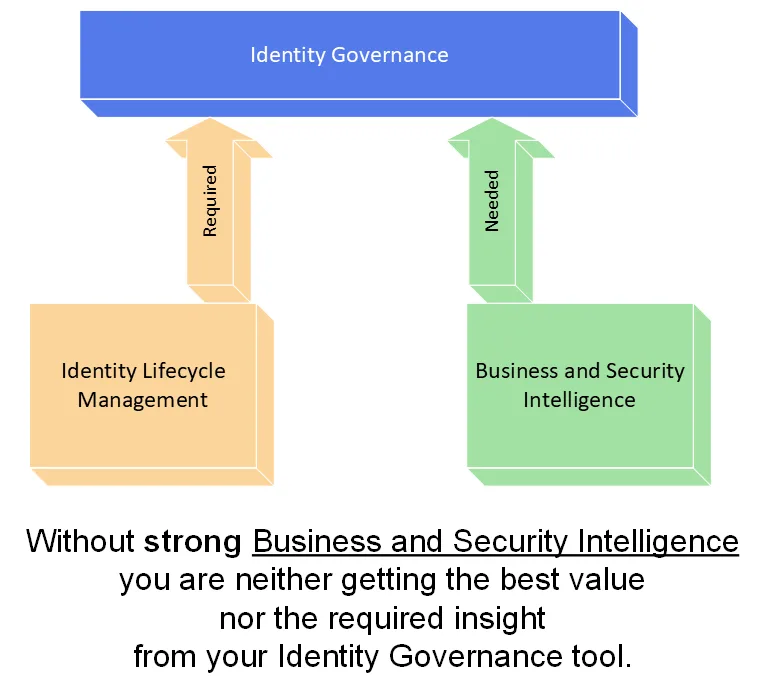
Identity Governance should provide Business and Security Intelligence
To summarize, here’s what you get by externalizing your reporting from SailPoint to a Business Intelligence tool reading from a read-only database delivers:
Better Performance
More Flexibility
Stronger, More Granular Security
Less Maintenance Overhead
Fast Development Time
Happy Customers
Happy Program Owners
Do note that these benefits are not restricted SailPoint environments only. Any identity governance environment can benefit from this solution.
How Can This Benefit You?
If you have read this far, you may be wondering “All this is great but how can I reap the benefits of such a system? How does this benefit me?”.
Because we have successfully demonstrated and delivered the benefits and immense value of such a solution to our clients, and received very positive feedback in the process, we have decided to extend this as a service to anyone currently using SailPoint as their identity governance tool.
Our “Identity Reporting as a Service” includes:
Unlimited reports and report development hours
Ongoing support and maintenance of the solution
Flexibility to host the solution on-premises or in the cloud, and
Proprietary capability to consume and treat SailPoint XML data as tabular data
A fixed monthly cost with no surprises
Do note that currently we are running an introductory promotional price till June 2022. After that the price for our IdRaaS will be going up by 50%.
If you would like to learn more about our Identity Reporting as a Service, please submit this form and we will get back to you: